
99% of Automated Workflows Fail Because They Still Require Human Input
Automated AI workflows only run unattended when you eliminate human input fields entirely — the first step must pull data from connected systems like Salesforce, HubSpot, Notion, or web search tools. Hatz AI's simple schedule builder handles 99% of use cases, running hourly to monthly with outputs stored in run history so no one needs to log in.
“We see this pattern constantly — teams build sophisticated AI workflows that still require someone to click 'go' every morning. When 99% of scheduling needs are met by the simple builder, the bottleneck isn't the technology — it's the workflow design that keeps humans in the loop unnecessarily.”
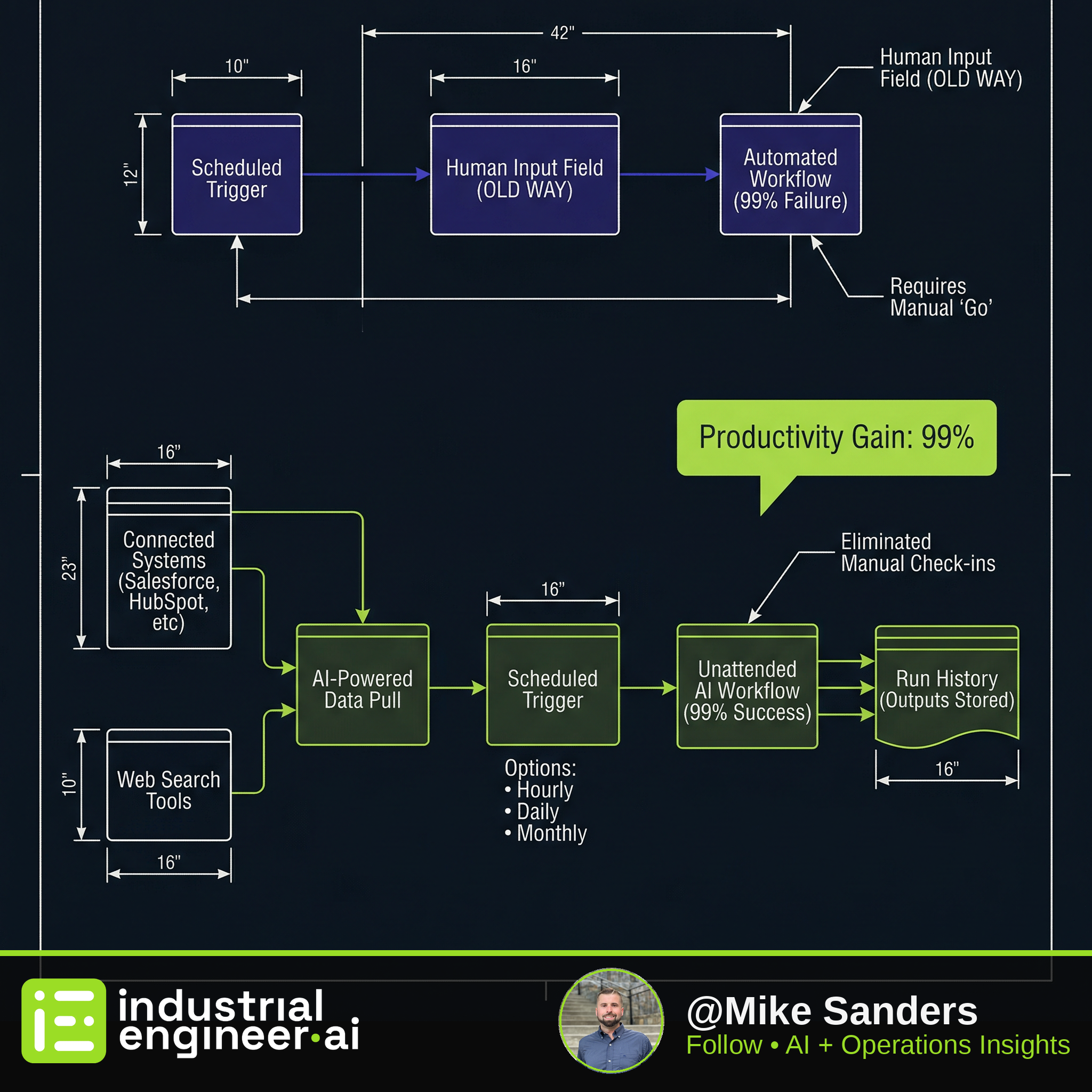
Automated AI workflows only run unattended when you eliminate human input fields entirely — the first step must pull data from connected systems like Salesforce, HubSpot, Notion, or web search tools. Hatz AI's simple schedule builder handles 99% of use cases, running hourly to monthly with outputs stored in run history so no one needs to log in.
From the Source
"This works best with workflows that actually don't have these red boxes... you don't need to actually have any user inputs. Your first step might be something like a web search or accessing files in Microsoft or using the Zapier MCP server to get more live data."
— Multi-Step Business Process Automation (2 videos: Automate Your AI Workflows | Hatz AI | Your First 5 AI Use Cases (AI Navigator Certification) | Hatz AI)
Key Takeaways
- 01Workflow triggers run on schedules (hourly, daily, weekly, monthly) but break instantly if any step has a red input box waiting for a human — design your first step to pull from connected systems instead
- 02Start with secure chat as your first AI use case to build prompt engineering skills before attempting automated workflows — the crawl-walk-run approach prevents costly deployment failures
- 03Auto-tool functionality lets AI choose between Firecrawl, Perplexity, Tavily, and Exa to scrape, search, and summarize — turning a scattered Google research session into an actionable report in one prompt
- 04Outputs from triggered workflows live in run history, accessible without logging in — this eliminates the 'did it run?' check-ins that interrupt actual work
- 05Custom cron expressions enable granular scheduling beyond the simple builder, and AI can generate these expressions for you if needed
Watch the Source
Multi-Step Business Process Automation (2 videos: Automate Your AI Workflows | Hatz AI | Your First 5 AI Use Cases (AI Navigator Certification) | Hatz AI)
Source
Multi-Step Business Process Automation (2 videos: Automate Your AI Workflows | Hatz AI | Your First 5 AI Use Cases (AI Navigator Certification) | Hatz AI)
Video embedded above — watch without leaving the site
Extracted and verified via Adversarial AI Pipeline
// RELATED SOLUTIONS
Get the IE.AI Weekly Brief
Top 3 AI-distilled industrial engineering insights, every Sunday. No fluff.
No spam. Unsubscribe anytime with one click.